
Reducing Container Bloat with DockerSlim and Wolfi Linux
Explore how DockerSlim and Wolfi Linux can help you combat container bloat in your development process. Discover strategies for optimizing Docker images and enhancing security, ensuring efficient and seamless deployments for modern applications.
Reducing Container Bloat with DockerSlim and Wolfi Linux
In the evolving landscape of software development, containerization has become an indispensable tool. However, with its benefits come challenges, particularly container bloat. Strategies like using DockerSlim and Wolfi Linux can help address this issue, ensuring efficient and secure containers.
Understanding Container Bloat
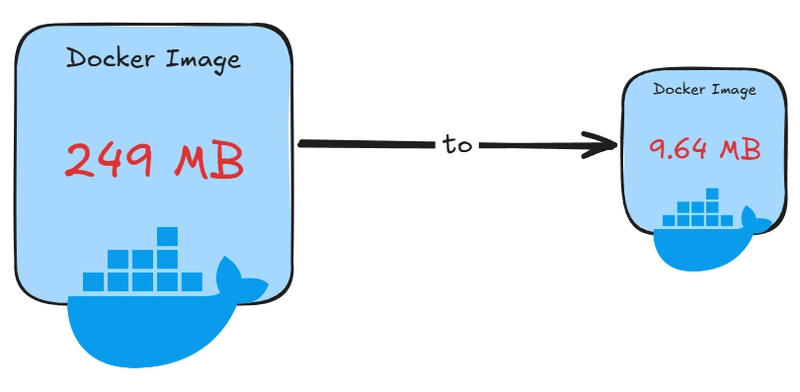
Container bloat occurs when Docker images become unnecessarily large due to unused packages, libraries, or layers. This can lead to increased costs, slower deployment, and more complicated management. Tackling this challenge effectively is essential for maintaining streamlined DevOps processes.
What is DockerSlim?

DockerSlim is a powerful tool designed specifically to reduce Docker image size. By optimizing Docker containers, developers can minify Docker images without sacrificing functionality. This tool analyzes your containers, identifies unnecessary content, and shrinks Docker images significantly.
How DockerSlim Works
DockerSlim works by instrumenting a container, running minimal tests, and generating a reduced image. Here's a step-by-step guide:
Install DockerSlim: This tool can be easily installed via package managers or from source.
Analyze Your Images: Run the DockerSlim command against your Docker images. This analyzes the image and removes unused components.
Create Minified Images: The process concludes with the generation of a much lighter image, ready for deployment.
Utilizing DockerSlim for efficient containerization means not just size reduction but also faster and safer deployments.
Introducing Wolfi Linux

Wolfi Linux provides a minimalist, security-focused base for containers. Utilizing Wolfi Linux for secure containers ensures that your deployments are not only efficient but also robust against security threats.
Key Features of Wolfi Linux
Minimal Base Image: The Wolfi Linux minimal base image is designed to provide only the necessities, eliminating unnecessary components that could lead to vulnerabilities.
Enhanced Security: By focusing on security from the ground up, Wolfi Linux ensures your applications are running in a safe environment.
Optimized for Microservices: Wolfi Linux offers an ideal foundation for creating lightweight, efficient applications.
Benefits of Using DockerSlim and Wolfi Linux Together
Combining DockerSlim and Wolfi Linux can maximize your container efficiency and security. Here are some key benefits:
Significant Image Size Reduction: DockerSlim shrinks Docker images while maintaining necessary functionalities, and Wolfi Linux’s lightweight containers complement this by starting from a minimal baseline.
Improved Deployment Times: Smaller images mean faster load times and quicker deployments across various environments.
Enhanced Security Measures: With a minimal attack surface, thanks to Wolfi Linux, your applications are inherently more secure.
Implementing the Strategy in DevOps
DockerSlim and Wolfi Linux present a robust strategy for optimizing container workflows. Here’s how to integrate these tools:
Evaluate Current Container Sizes: Assess your existing containers to understand the scope of bloat.
Adopt DockerSlim Optimization: Regularly employ DockerSlim to optimize your Docker containers and maintain minimal images.
Transition to Wolfi Linux: Wherever feasible, use Wolfi Linux as your base image to ensure a lean starting point.
Actionable Tips to Get Started
Here are some actionable steps you can take today to start reducing container bloat:
Download and set up DockerSlim on your development machine to begin optimizing your current Docker images.
Review your current base images and experiment with replacing them with the Wolfi Linux minimal base image.
Run regular analyses of your Docker files to identify unnecessary packages or layers, aiming to simplify them progressively.
Conclusion
Optimizing your Docker images by reducing container size and increasing security is not just beneficial but necessary for efficient, scalable application development. Leveraging DockerSlim and Wolfi Linux not only shrinks Docker images but also enhances security, fostering a robust development lifecycle suited to modern tech needs. Start incorporating these tools into your workflow to see noticeable improvements in performance and security.
You may also like

What Is TypeSafe AI?
Discover Jev, TypeSafe AI’s System One Model for fast, type-safe, calibrated AI decisions built for software automation.

What Is Paperclip and How Does It Help You Manage AI Agent Teams?
Learn what Paperclip is, how it manages AI agent teams, controls costs, enables human approvals, and coordinates agents across different AI runtimes.

How Do You Actually Teach Engineering Judgment?
Learn how STEMLink teaches engineering judgment through a four-step approach: learn, build, test limitations, and understand why real-world systems need more.