
What Is Paperclip and How Does It Help You Manage AI Agent Teams?
Learn what Paperclip is, how it manages AI agent teams, controls costs, enables human approvals, and coordinates agents across different AI runtimes.
What Is Paperclip and How Does It Help You Manage AI Agent Teams?
TL;DR: Paperclip is an open-source, self-hosted platform for managing teams of AI agents the way a company manages employees. It gives every agent a role, every task an owner, every run a budget, and every important decision a human approval step.
Running one AI coding agent is easy. Running five or ten of them across Claude Code, Codex, and other tools quickly becomes chaotic. Nobody is sure which agent owns which task, how much each one is spending, or whether "done" actually means done. Paperclip was built to solve exactly that problem, and this guide answers the most common questions about what it is, how it works, and whether you need it.
What Is Paperclip AI?
TL;DR: Paperclip is an AI agent management platform that organizes agents into an org chart, assigns them tasks, and keeps humans in control.
Paperclip is an open-source application, released under the MIT License by Paperclip Labs, that lets you coordinate many AI agents from one place. Instead of treating agents as isolated chat sessions, Paperclip treats them like members of a company. Each agent gets a role, such as CTO, engineer, QA tester, or designer, and sits in an org chart alongside the humans who supervise it.
The product is organized into four areas, each built for a different group of people. The agentic task manager is for everyone who assigns and reviews work daily. The org chart for agents is for managers who define roles and permissions. The agent training area is for people who improve agent quality through skills and evaluations. Finally, the agentic OS layer is for IT and platform teams who run the infrastructure underneath.
How Does Paperclip Manage AI Agent Teams?
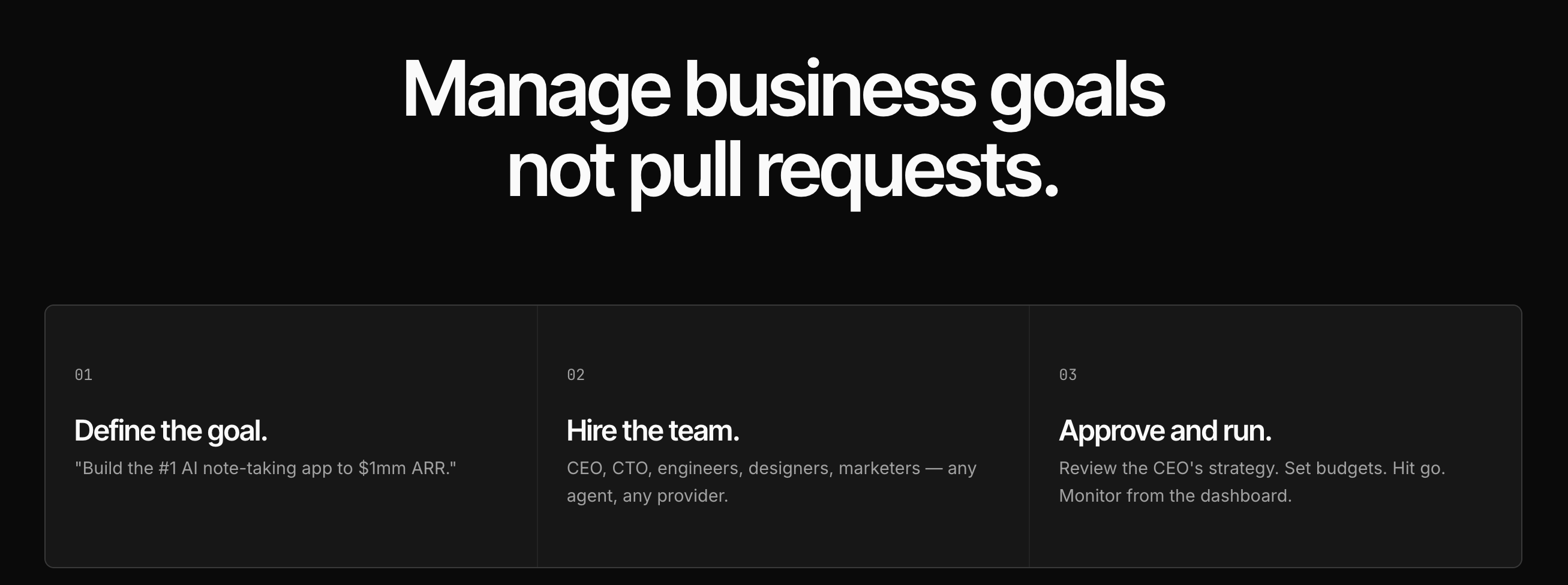
TL;DR: You declare the goal, agents do the work, and you verify the output using real evidence like diffs, screenshots, and test results.
The core workflow in Paperclip is simple. A person states the intent, agents pick up and complete the work, and a human verifies the result. Tasks carry owners and review gates, so work cannot quietly slip through without someone checking it. Agents can also act as proactive coworkers, keeping tasks moving between your prompts rather than waiting for you to push every step.
A key technical detail is atomic task checkout. When an agent claims a task, no other agent can claim the same one, which prevents two agents from duplicating effort or overwriting each other. Tasks can also record dependencies, so a QA task can stay blocked until the build task it depends on is finished. This turns a loose collection of agents into a coordinated team with a clear order of work.
What Is an AI Agent Control Plane, and Where Does Paperclip Fit?
TL;DR: A control plane is the management layer around AI agents. Paperclip governs the "organizational work" layer: goals, tasks, owners, budgets, and reviews.
The term "control plane" comes from networking, where engineers separated the logic that decides where traffic goes from the hardware that actually moves it. Applied to AI, the data plane is where agents do their work, such as generating code or calling tools. The control plane manages the conditions around that work, including policies, permissions, budgets, and review.
Paperclip's own guide explains that "AI agent control plane" can describe five different layers: workflow graphs, infrastructure and gateways, individual runtime actions, enterprise identity and compliance, and organizational work. Paperclip deliberately focuses on the last one. It governs why a task exists, who owns it, what blocks it, how much it can spend, and when a human must decide. It does not try to intercept every single tool call or shell command, so it works best alongside other tools rather than replacing them.
How Does Paperclip Control AI Agent Costs and Budgets?
TL;DR: Paperclip supports company-wide and per-agent budgets that warn you near a limit and stop new work at a hard cap.
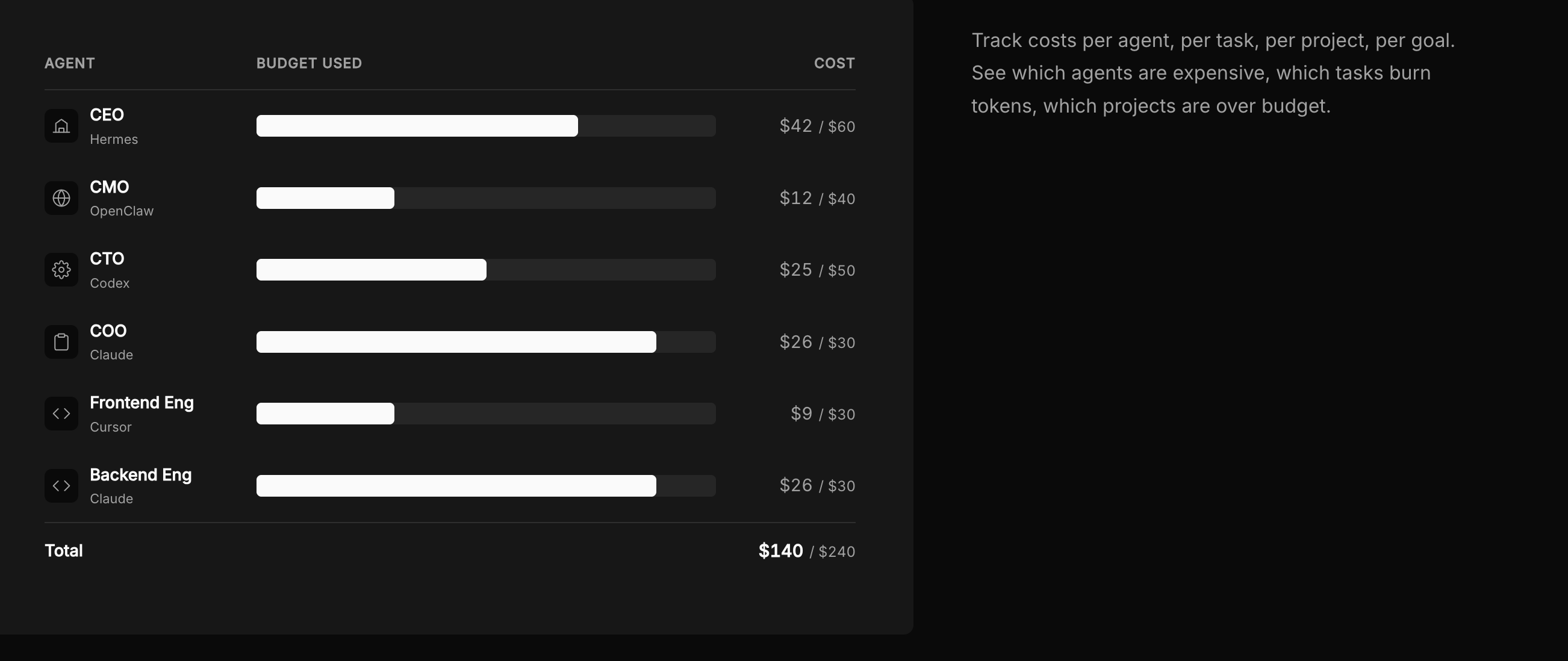
Cost is one of the biggest risks of running autonomous agents, because an agent stuck in a loop can burn through API credits fast. Paperclip lets you set budgets at both the company level and the individual agent level. As spending approaches a limit, you get a warning, and once a hard limit is hit, Paperclip stops new Paperclip-managed work from starting.
It is worth being clear about the boundary here. These budget stops apply to work that runs through Paperclip, not to every charge on your model provider account outside of it. For finance teams, the benefit is that every agent works under a defined cap and every task leaves a record of what it cost.
How Do Human Approvals Work in Paperclip?
TL;DR: Agents propose, humans decide. Paperclip's Decisions feature lets an agent request permission for a specific action before it proceeds.
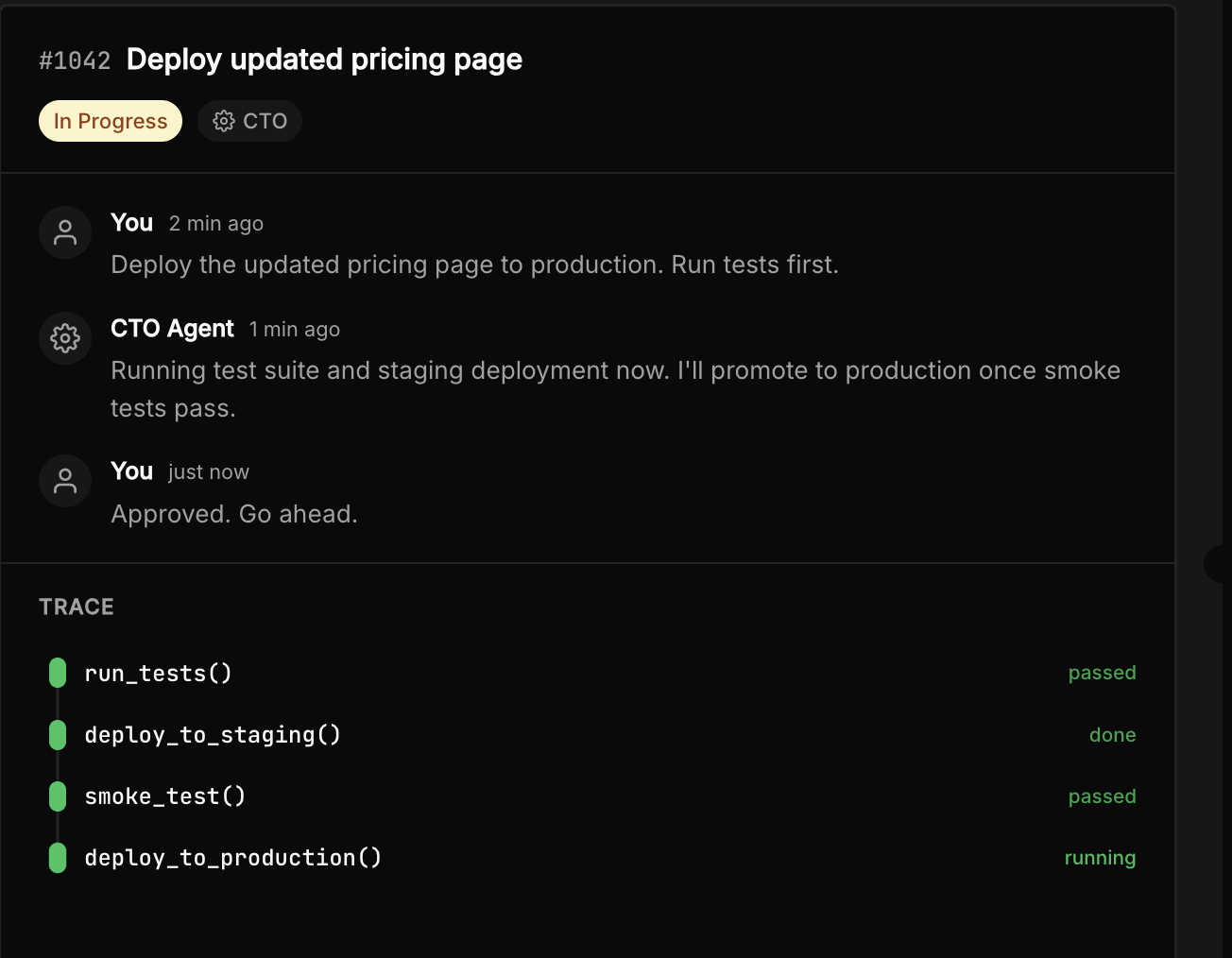
Paperclip is designed around the idea that important choices should stay in human hands. Execution policies can require review or approval before a task counts as complete. The Decisions feature, introduced in release v2026.817.0, lets an agent pause and ask a person to approve a specific action, and that choice is saved in the work record.
Security is handled in a similar spirit. Secrets can be scoped to exactly the agent that needs them, and agents can request an approved secret through an API only at the moment they need it, rather than holding it for the entire run. Every request is logged, which gives you an audit trail of who accessed what and when.
Which AI Agents Can You Use With Paperclip?
TL;DR: Paperclip is built for "bring your own agent," with built-in adapters for Claude, Codex, and Hermes.
Paperclip uses a cross-provider runtime, so you are not locked into one model vendor. Its extensions include local adapters for Claude and Codex, plus a Hermes gateway adapter. You can invite a running Hermes agent by generating a one-time onboarding prompt, pasting it to the agent, and approving its join request.
Beyond adapters, Paperclip supports shared skills that encode your team's procedures once for the whole organization, as well as MCP server connections and app connectors. Connectors let you choose exactly which apps, accounts, and actions each agent can access, so a support agent and an engineering agent can have very different permissions.
Is Paperclip Open Source and Self-Hosted?
TL;DR: Yes. Paperclip is MIT-licensed, available on GitHub, and runs on your own infrastructure. A cloud beta waitlist is also open.
Paperclip is fully open source, with its code published on GitHub under the MIT License. It is self-hosted by default, which means your data path stays under your control rather than passing through a third-party service. The platform includes sandboxed execution with deny-by-default network policies, along with enterprise controls such as SSO, RBAC, and cost management.
For teams that would rather not run their own servers, Paperclip also offers a waitlist for its Paperclip Cloud beta. Installation instructions and API reference material are available in the official documentation at docs.paperclip.ing.
Who Should Use Paperclip?
TL;DR: Paperclip suits teams already running several useful agents who now need ownership, budgets, and review. It is overkill for a single simple agent.
Paperclip offers ready-made setups for engineering, support, sales and marketing, operations, and finance. In engineering, coder agents pick up issues while QA agents verify with tests and screenshots. In support, agents triage requests and escalate judgment calls to a named human. In operations and finance, agents run recurring reports and reconciliations on a schedule and surface only the exceptions.
However, Paperclip itself is honest about when it is not needed. If you are building your first agent, hosting a single service, or only need to block unsafe tool calls, a smaller tool is a better fit. Paperclip becomes valuable when agents multiply across runtimes, run unattended, depend on one another, and accumulate real cost.
FAQs
Is Paperclip free?
Paperclip is open source under the MIT License, so you can self-host it without a license fee. Your model provider costs still apply.
Does Paperclip replace LangGraph or other agent frameworks?
No. Frameworks like LangGraph control workflow execution, while Paperclip governs the organizational work around agent runs. They can be used together.
Does a completed task in Paperclip prove the code works?
No. A completed task is a workflow status, not proof of passing tests, a merge, or a deployment. Those facts remain authoritative in your repository, CI, and deployment systems.
Can multiple agents work on the same task?
Not at the same time. Atomic checkout ensures only one agent owns a task, preventing duplicate or conflicting work.
Where can I learn more about Paperclip?
The Paperclip blog publishes product updates, guides, and research, and the official docs cover installation and the API.
You may also like

What Is TypeSafe AI?
Discover Jev, TypeSafe AI’s System One Model for fast, type-safe, calibrated AI decisions built for software automation.

How Do You Actually Teach Engineering Judgment?
Learn how STEMLink teaches engineering judgment through a four-step approach: learn, build, test limitations, and understand why real-world systems need more.

Why We Call It Contoso?
Why is Contoso used in the Contoso Document Security project? Learn why the fictional name creates a clear learning scenario and helps students understand the limits of their work.